---
title: Learn about GDPR-Compliant Referrals
description: In this article, users will learn what referral status looks like for GDPR Companies.
---
[Skip to content](https://support.erinapp.com/knowledge/gdpr#main-content)
English
Show submenu for translations
[Contact us](https://support.erinapp.com/knowledge/kb-tickets/new?hsLang=en) [Customer portal](https://support.erinapp.com/tickets-view?hsLang=en)
![erinlogo.png\]](https://support.erinapp.com/hs-fs/hubfs/erinlogo.png?height=40&name=erinlogo.png)
Open main navigation
Close main navigation
- English
Show submenu for translations
- [Contact us](https://support.erinapp.com/knowledge/kb-tickets/new)
- [Customer portal](https://support.erinapp.com/tickets-view)
- Log in to ERIN
Log in to ERIN
How can we help you?
- There are no suggestions because the search field is empty.
1. [Support Center](https://support.erinapp.com/knowledge?hsLang=en)
2. [Security & Compliance](https://support.erinapp.com/knowledge/security-compliance?hsLang=en)
# Learn about GDPR-Compliant Referrals
To follow along with this article, you will need to:
- Belong to a company in the European Union or European Economic Area
### Overview
In this article, users will learn what referral status looks like for GDPR Companies.
### 1. About GDPR
GDPR (General Data Protection Regulation) is a regulation in EU law that limits how organizations can store and use personal data. As a GDPR-compliant organization, ERIN will not store Candidate data unless candidates opt in to share their personal data.
Because of this, your referral experience may be different from another company’s. If GDPR acceptance is enabled, your referral won’t be stored until a candidate accepts their referral.
#### 1.1. Candidate Status Changes
***1.1.a.* Candidate Name not Stored**
GDPR restricts storing a referred candidate's contact information.
Instead, your referral will show a "**Pending Acceptance**" message, letting you know that you’ve referred a candidate but that they have not accepted your referral yet (Fig. 1.1).
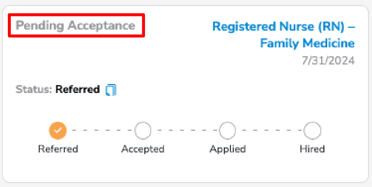
Figure 1.1
***1.1.b.* Validate Candidate Contact Information**
Did you enter the wrong email address? No problem! You can copy that individualized referral link from the Pending referral simply by clicking the icon next to "**Referred**" (Fig. 1.2). From there, just send it to your friend and you’re good to go!
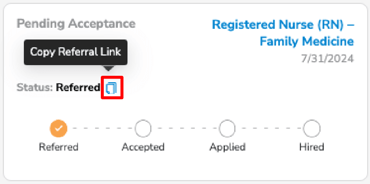
Figure 1.2
***1.1.c.* Track Referral Status After Acceptance**
Once your referral accepts, they’ll show up on your "**My Referrals**" page and can be tracked along the hiring process, now with their name and contact information included (Fig. 1.3).
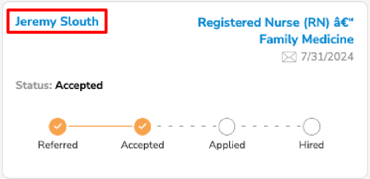
Figure 1.3
- [FAQs](https://support.erinapp.com/knowledge/faqs?hsLang=en#main-content)
- [Referral](https://support.erinapp.com/knowledge/faqs?hsLang=en#referral)
- [Bonus](https://support.erinapp.com/knowledge/faqs?hsLang=en#bonus)
- [Employee Features](https://support.erinapp.com/knowledge/employee-features?hsLang=en#main-content)
- [Set Up](https://support.erinapp.com/knowledge/employee-features?hsLang=en#set-up)
- [My Referrals](https://support.erinapp.com/knowledge/employee-features?hsLang=en#my-referrals)
- [My Bonuses](https://support.erinapp.com/knowledge/employee-features?hsLang=en#my-bonuses)
- [Admin Features](https://support.erinapp.com/knowledge/admin-features?hsLang=en#main-content)
- [Referrals](https://support.erinapp.com/knowledge/admin-features?hsLang=en#referrals)
- [Notifications](https://support.erinapp.com/knowledge/admin-features?hsLang=en#notifications)
- [Reports](https://support.erinapp.com/knowledge/admin-features?hsLang=en#reports)
- [Integrations](https://support.erinapp.com/knowledge/integrations?hsLang=en)
- [Security & Compliance](https://support.erinapp.com/knowledge/security-compliance?hsLang=en)
- [Troubleshooting](https://support.erinapp.com/knowledge/troubleshooting?hsLang=en#main-content)
- [Set Up](https://support.erinapp.com/knowledge/troubleshooting?hsLang=en#set-up)
- [Referral FAQs](https://support.erinapp.com/knowledge/troubleshooting?hsLang=en#referral-faqs)
- [Bonus FAQs](https://support.erinapp.com/knowledge/troubleshooting?hsLang=en#bonus-faqs)
- [Informational](https://support.erinapp.com/knowledge/informational?hsLang=en#main-content)
- [My Referrals](https://support.erinapp.com/knowledge/informational?hsLang=en#my-referrals)
- [My Bonuses](https://support.erinapp.com/knowledge/informational?hsLang=en#my-bonuses)
- [Referrals](https://support.erinapp.com/knowledge/informational?hsLang=en#referrals)
- [Bonus FAQs](https://support.erinapp.com/knowledge/informational?hsLang=en#bonus-faqs)
- [Set Up](https://support.erinapp.com/knowledge/informational?hsLang=en#set-up)
- [Steps to Follow](https://support.erinapp.com/knowledge/steps-to-follow?hsLang=en#main-content)
- [My Referrals](https://support.erinapp.com/knowledge/steps-to-follow?hsLang=en#my-referrals)
- [Set Up](https://support.erinapp.com/knowledge/steps-to-follow?hsLang=en#set-up)
- [Bonus FAQs](https://support.erinapp.com/knowledge/steps-to-follow?hsLang=en#bonus-faqs)
- [My Points](https://support.erinapp.com/knowledge/steps-to-follow?hsLang=en#my-points)
- [Internal Mobility](https://support.erinapp.com/knowledge/steps-to-follow?hsLang=en#internal-mobility)
[](http://www.erinapp.com)
© 2026 ERIN Technologies, Inc. All Rights Reserved.
Copyright © 2026, ERIN Technologies Inc.