---
title: Why Haven't I Received My Eligible Bonus?
description: In this article, users will learn reasons why an eligible bonus hasn't been paid out yet and when to expect a payment.
---
[Skip to content](https://support.erinapp.com/knowledge/employee/where-is-my-bonus#main-content)
English
Show submenu for translations
[Contact us](https://support.erinapp.com/knowledge/kb-tickets/new?hsLang=en) [Customer portal](https://support.erinapp.com/tickets-view?hsLang=en)
![erinlogo.png\]](https://support.erinapp.com/hs-fs/hubfs/erinlogo.png?height=40&name=erinlogo.png)
Open main navigation
Close main navigation
- English
Show submenu for translations
- [Contact us](https://support.erinapp.com/knowledge/kb-tickets/new)
- [Customer portal](https://support.erinapp.com/tickets-view)
- Log in to ERIN
Log in to ERIN
How can we help you?
- There are no suggestions because the search field is empty.
1. [Support Center](https://support.erinapp.com/knowledge?hsLang=en)
2. [Troubleshooting](https://support.erinapp.com/knowledge/troubleshooting?hsLang=en)
3. [Bonus FAQs](https://support.erinapp.com/knowledge/troubleshooting?hsLang=en#bonus-faqs)
# Why Haven't I Received My Eligible Bonus?
### Overview
In this article, users will learn reasons why an eligible bonus hasn't been paid out yet and when to expect a payment.
### 1. Verify that your Bonus is Eligible
To check that your bonus is indeed eligible, first select "**My Bonuses**" from your dashboard (Fig. 1a).
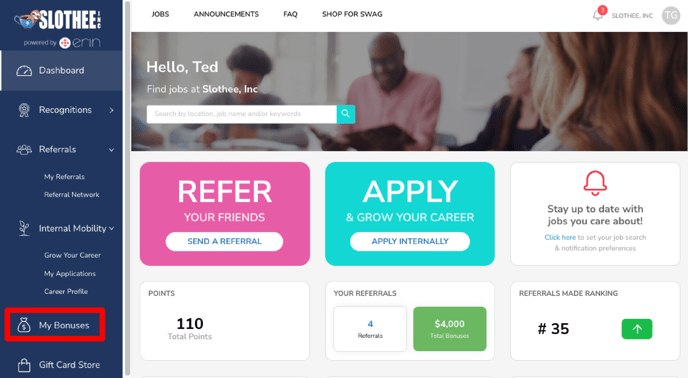
Figure 1a
Next, make sure that the bonus status of your candidate is "Eligible" (Fig. 1b).
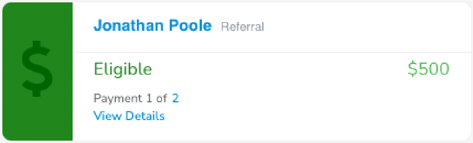
Figure 1b
If the bonus status of your candidate is not "Eligible", go to [Learn about How Bonuses are Paid](https://support.erinapp.com/knowledge/how-will-my-bonus-be-paid?hsLang=en) to learn when your bonus will be paid out.
#### 1.1. Candidate not in "My Bonuses"
If you don't see your candidate under "**My Bonuses**", go to the "**My Referrals**" tab and verify that your candidate's referral status is "Hired" (Fig. 1c). Only referrals for hired candidates are eligible for bonuses.
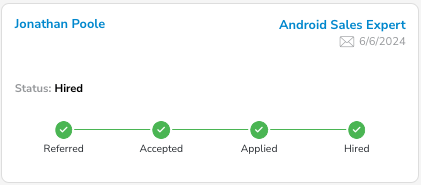
Figure 1c
#### 1.2. Candidate Not Listed as Hired
To troubleshoot why a referred candidate isn't in your "**My Referrals**" page or their status is incorrect, go to [Why is my Referral Not Shown in ERIN?](https://support.erinapp.com/knowledge/i-made-a-referral-outside-of-erin.-why-isnt-it-listed-under-my-referrals?hsLang=en)
#### 1.3. Candidate Listed as Hired
If your candidate is listed as "Hired" in "My Referrals" but does not appear in "My Bonuses", we recommend that you **contact ERIN support**.
***1.3.a.* ERIN Browser Support**
Use the **chat bubble** in the bottom-right of the screen in your browser to request a review of your referral (Fig. 1d).
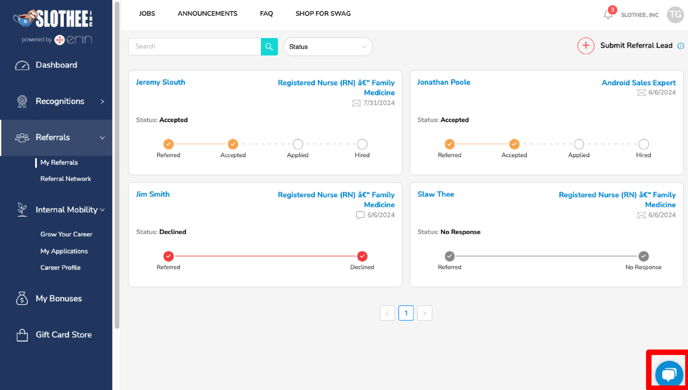Figure 1d
***1.3.b.* ERIN Mobile App Support**
Use the "**Support**" tab in the mobile app to request a review of your referral (Fig. 1e).
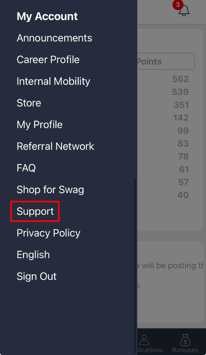
Figure 1e
### 2. Find your Company's Bonus Policy
Now that you've made sure your bonus is eligible, you will be paid according to your company's bonus policy. To find your company's policy, scroll to the bottom of your dashboard (Fig. 2).
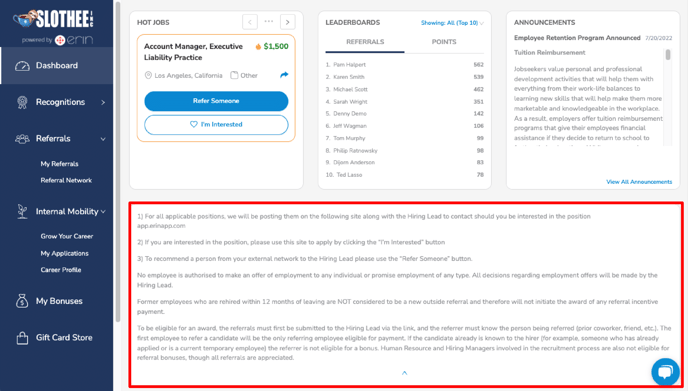Figure 2
If you still have questions regarding payment, contact your company's Recruitment or Talent Acquisition team.
- [FAQs](https://support.erinapp.com/knowledge/faqs?hsLang=en#main-content)
- [Referral](https://support.erinapp.com/knowledge/faqs?hsLang=en#referral)
- [Bonus](https://support.erinapp.com/knowledge/faqs?hsLang=en#bonus)
- [Employee Features](https://support.erinapp.com/knowledge/employee-features?hsLang=en#main-content)
- [Set Up](https://support.erinapp.com/knowledge/employee-features?hsLang=en#set-up)
- [My Referrals](https://support.erinapp.com/knowledge/employee-features?hsLang=en#my-referrals)
- [My Bonuses](https://support.erinapp.com/knowledge/employee-features?hsLang=en#my-bonuses)
- [Admin Features](https://support.erinapp.com/knowledge/admin-features?hsLang=en#main-content)
- [Referrals](https://support.erinapp.com/knowledge/admin-features?hsLang=en#referrals)
- [Notifications](https://support.erinapp.com/knowledge/admin-features?hsLang=en#notifications)
- [Reports](https://support.erinapp.com/knowledge/admin-features?hsLang=en#reports)
- [Integrations](https://support.erinapp.com/knowledge/integrations?hsLang=en)
- [Security & Compliance](https://support.erinapp.com/knowledge/security-compliance?hsLang=en)
- [Troubleshooting](https://support.erinapp.com/knowledge/troubleshooting?hsLang=en#main-content)
- [Set Up](https://support.erinapp.com/knowledge/troubleshooting?hsLang=en#set-up)
- [Referral FAQs](https://support.erinapp.com/knowledge/troubleshooting?hsLang=en#referral-faqs)
- [Bonus FAQs](https://support.erinapp.com/knowledge/troubleshooting?hsLang=en#bonus-faqs)
- [Informational](https://support.erinapp.com/knowledge/informational?hsLang=en#main-content)
- [My Referrals](https://support.erinapp.com/knowledge/informational?hsLang=en#my-referrals)
- [My Bonuses](https://support.erinapp.com/knowledge/informational?hsLang=en#my-bonuses)
- [Referrals](https://support.erinapp.com/knowledge/informational?hsLang=en#referrals)
- [Bonus FAQs](https://support.erinapp.com/knowledge/informational?hsLang=en#bonus-faqs)
- [Set Up](https://support.erinapp.com/knowledge/informational?hsLang=en#set-up)
- [Steps to Follow](https://support.erinapp.com/knowledge/steps-to-follow?hsLang=en#main-content)
- [My Referrals](https://support.erinapp.com/knowledge/steps-to-follow?hsLang=en#my-referrals)
- [Set Up](https://support.erinapp.com/knowledge/steps-to-follow?hsLang=en#set-up)
- [Bonus FAQs](https://support.erinapp.com/knowledge/steps-to-follow?hsLang=en#bonus-faqs)
- [My Points](https://support.erinapp.com/knowledge/steps-to-follow?hsLang=en#my-points)
- [Internal Mobility](https://support.erinapp.com/knowledge/steps-to-follow?hsLang=en#internal-mobility)
[](http://www.erinapp.com)
© 2026 ERIN Technologies, Inc. All Rights Reserved.
Copyright © 2026, ERIN Technologies Inc.