---
title: Learn about the My Referrals Tab
description: A brief guide to the My Referrals tab.
---
[Skip to content](https://support.erinapp.com/migration/knowledge/my-referrals#main-content)
English
Show submenu for translations
[Contact us](https://support.erinapp.com/migration/knowledge/kb-tickets/new?hsLang=en) [Customer portal](https://support.erinapp.com/tickets-view?hsLang=en) [Sign in](https://support.erinapp.com/_hcms/mem/login?redirect_url=https%3A%2F%2Fsupport.erinapp.com%2Fmigration%2Fknowledge%2Fmy-referrals&hsLang=en)
![erinlogo.png\]](https://support.erinapp.com/hs-fs/hubfs/erinlogo.png?height=40&name=erinlogo.png)
- [Default HubSpot Blog](https://5037052.hs-sites.com/blog)
Open main navigation
Close main navigation
- [Default HubSpot Blog](https://5037052.hs-sites.com/blog)
- English
Show submenu for translations
- [Contact us](https://support.erinapp.com/migration/knowledge/kb-tickets/new)
- [Customer portal](https://support.erinapp.com/tickets-view)
- [Sign in](https://support.erinapp.com/_hcms/mem/login?redirect_url=https%3A%2F%2Fsupport.erinapp.com%2Fmigration%2Fknowledge%2Fmy-referrals)
- Log in to ERIN
Log in to ERIN
How can we help you?
- There are no suggestions because the search field is empty.
1. [Support Center](https://support.erinapp.com/migration/knowledge?hsLang=en)
2. [Informational](https://support.erinapp.com/migration/knowledge/informational?hsLang=en)
3. [My Referrals](https://support.erinapp.com/migration/knowledge/informational?hsLang=en#my-referrals)
- [FAQs](https://support.erinapp.com/migration/knowledge/faqs?hsLang=en#main-content)
- [Referral](https://support.erinapp.com/migration/knowledge/faqs?hsLang=en#referral)
- [Bonus](https://support.erinapp.com/migration/knowledge/faqs?hsLang=en#bonus)
- [Employee Features](https://support.erinapp.com/migration/knowledge/employee-features?hsLang=en#main-content)
- [Set Up](https://support.erinapp.com/migration/knowledge/employee-features?hsLang=en#set-up)
- [My Referrals](https://support.erinapp.com/migration/knowledge/employee-features?hsLang=en#my-referrals)
- [My Bonuses](https://support.erinapp.com/migration/knowledge/employee-features?hsLang=en#my-bonuses)
- [Admin Features](https://support.erinapp.com/migration/knowledge/admin-features?hsLang=en#main-content)
- [Referrals](https://support.erinapp.com/migration/knowledge/admin-features?hsLang=en#referrals)
- [Notifications](https://support.erinapp.com/migration/knowledge/admin-features?hsLang=en#notifications)
- [Reports](https://support.erinapp.com/migration/knowledge/admin-features?hsLang=en#reports)
- [Integrations](https://support.erinapp.com/migration/knowledge/integrations?hsLang=en)
- [Security & Compliance](https://support.erinapp.com/migration/knowledge/security-compliance?hsLang=en)
- [Troubleshooting](https://support.erinapp.com/migration/knowledge/troubleshooting?hsLang=en#main-content)
- [Set Up](https://support.erinapp.com/migration/knowledge/troubleshooting?hsLang=en#set-up)
- [Referral FAQs](https://support.erinapp.com/migration/knowledge/troubleshooting?hsLang=en#referral-faqs)
- [Bonus FAQs](https://support.erinapp.com/migration/knowledge/troubleshooting?hsLang=en#bonus-faqs)
- [Informational](https://support.erinapp.com/migration/knowledge/informational?hsLang=en#main-content)
- [My Referrals](https://support.erinapp.com/migration/knowledge/informational?hsLang=en#my-referrals)
- [My Bonuses](https://support.erinapp.com/migration/knowledge/informational?hsLang=en#my-bonuses)
- [Referrals](https://support.erinapp.com/migration/knowledge/informational?hsLang=en#referrals)
- [Bonus FAQs](https://support.erinapp.com/migration/knowledge/informational?hsLang=en#bonus-faqs)
- [Set Up](https://support.erinapp.com/migration/knowledge/informational?hsLang=en#set-up)
- [Steps to Follow](https://support.erinapp.com/migration/knowledge/steps-to-follow?hsLang=en#main-content)
- [My Referrals](https://support.erinapp.com/migration/knowledge/steps-to-follow?hsLang=en#my-referrals)
- [Set Up](https://support.erinapp.com/migration/knowledge/steps-to-follow?hsLang=en#set-up)
- [Bonus FAQs](https://support.erinapp.com/migration/knowledge/steps-to-follow?hsLang=en#bonus-faqs)
- [My Points](https://support.erinapp.com/migration/knowledge/steps-to-follow?hsLang=en#my-points)
- [Internal Mobility](https://support.erinapp.com/migration/knowledge/steps-to-follow?hsLang=en#internal-mobility)
# Learn about the My Referrals Tab
## A brief guide to the My Referrals tab.
**What Happens After I Make A Referral?**
Once a referral is made, your contact will be sent an email or text with a link that they can use to accept the referral and apply to the job. You can track your referrals at any time on the ***My Referrals*** tab.
Once your candidate has clicked the referral link and accepted the referral, their status will change.
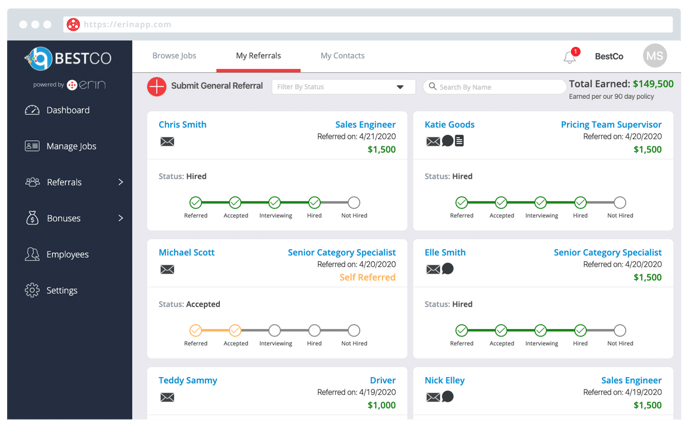
Here’s what the different statuses mean:
*No Response*: Your candidate did not interact with the referral link that was sent to them.
*Inactive*: Your candidate did not apply after accepting their referral.
*Referred*: You have referred a candidate.
*Accepted*: Your candidate has accepted their referral, but not applied.
*(Middle Status)*: Your candidate is currently being considered for the position.
*Hired/Not Hired*: A hiring decision has been made regarding your candidate.
- [Default HubSpot Blog](https://5037052.hs-sites.com/blog)
[](http://www.erinapp.com)
© 2024 ERIN Technologies, Inc. All Rights Reserved.
Copyright © 2026, ERIN Technologies Inc.